Menu
HTML Tutorial
Menu
HTML Elements
Introduction
An HTML element is the basic building block of a web page.
It tells the browser how to display content such as text, images, links, and more.
Each element usually has:
An opening tag — tells where the element begins
Content — what’s inside the element
A closing tag — tells where the element ends
Syntax of an HTML Element
Example Code
<tagname>Content goes here</tagname>
Explanation
<tagname>→ opening tagContent goes here→ element content</tagname>→ closing tag
Example
<p>This is a paragraph element.</p>
Output
This is a paragraph element.Nested HTML Elements
Elements can be placed inside other elements — this is called nesting.
Example Code
<p>This is a <b>bold</b> word inside a paragraph.</p>
Output
This is a bold word inside a paragraph.Empty HTML Elements
Some HTML elements don’t have closing tags. These are called empty elements or self-closing tags.
Example Code
<br> <!-- Line break -->
<hr> <!-- Horizontal line -->
<img src="image.jpg" alt="Sample image">
Output
<p>Learn HTML<br>Step by Step</p>
<hr>
Nested vs. Empty Elements
Nested Elements Example
<div>
  <p>Hello <b>World</b>!</p>
</div>
Empty Elements Example
<img src="logo.png" alt="Website Logo">
<br>
<hr>
HTML Block-Level vs Inline Elements
HTML elements are classified into block-level and inline categories.
| Type | Description | Example Tags |
|---|---|---|
| Block-level | Start on a new line and take full width | <div>, <p>, <h1>, <section>, <article> |
| Inline | Stay inline with text and only take as much width as needed | <span>, <a>, <b>, <i>, <img> |
Example Code
<p>This is a block-level paragraph.</p>
<a href="#">This is an inline link</a>
Output
This is a block-level paragraph.
This is an inline link
This is an inline link
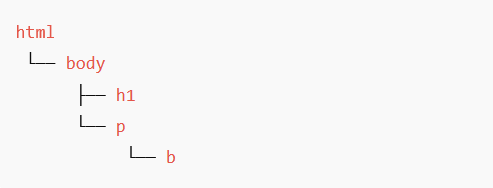
HTML Element Tree
Every HTML page forms a tree-like structure (called the DOM Document Object Model).
Example Code
<html>
  <body>
    <h1>Welcome</h1>
    <p>This is a <b>sample</b> paragraph.</p>
  </body>
</html>
Output