
CSS Tutorial
CSS Box Model
The CSS Box Model is one of the most fundamental concepts in web design and layout. Every HTML element on a webpage is treated as a box, and understanding how these boxes work helps you control spacing, alignment, borders, and sizing accurately.
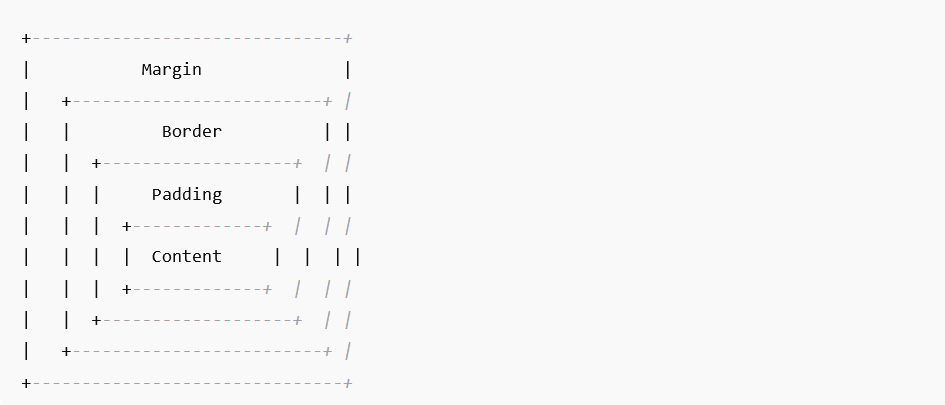
The Box Model is made up of four layers:
1. Content
This is the actual content inside the element — text, images, or other items you place inside a tag.
Example
p {
  width: 200px;
}
2. Padding
Padding is the space between the content and the border. It increases the clickable or readable area without affecting the border.
Example
p {
  padding: 20px;
}
3. Border
The border surrounds the padding and the content. You can style it with width, color, and type.
Example
div {
  border: 2px solid #000;
}
4. Margin
Margin is the space outside the border, used to create space between elements.
Example
div {
  margin: 30px;
}
Visual Representation of the Box Model
Box Sizing
By default, width and height apply only to the content box. To make width include padding + border, use:
* {
  box-sizing: border-box;
}
This makes layout easier and is recommended by most developers.
Box Model Properties Table
| Property | Description |
|---|---|
| width / height | Size of content area |
| padding | Space between content and border |
| border | Line around padding |
| margin | Space outside the border |
| box-sizing | Controls how width/height are calculated |
Why the Box Model Is Important?
- Helps design responsive layouts
- Controls spacing and alignment
- Prevents elements from “breaking” layout
- Improves page aesthetics and readability